
DAY_32 apache
web#1 에서 sbsuser/public_html 디렉터리의 apache 사용자가 접근 할 수 없도록 설정한다.
web1# chmod -c o= ~sbsuser/public_html
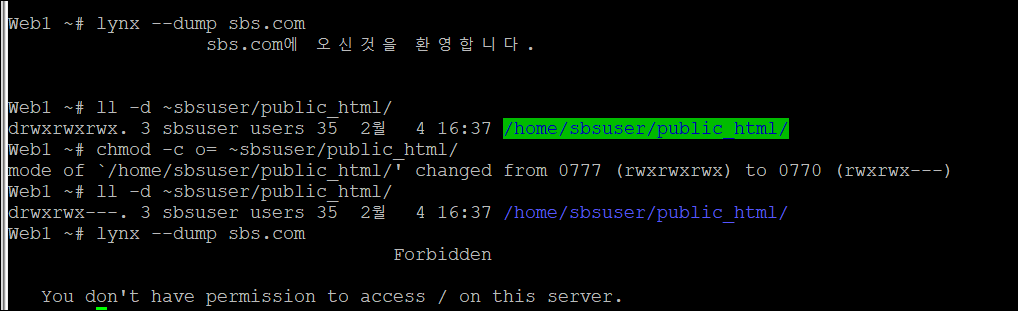
권한을 바꾸면 lynx로 접근하면 forbidden된다.
다시 웹사용자가 읽을 수 있도록 설정을 변경하면 웹사용자가 웹페이지를 읽을 수 있으므로 클라이언트에게 문서의 내용을 전달해주므로 웹페이지 문서를 확인할 수 있다.
web1# chmod -c o+x ~sbsuser/public_html

web1# vi /etc/httpd/httpd.conf
ServerAdmin 관리자이메일주소
ServerName 192.168.1.101:80
실습> <Directory> 컨테이너
아파치가 접근할 수 있는 각 디렉터리에 대하여 어떤 서비스와 기능을 허용할 것인지 거부할 것인지 여부를 설정할 수 있다.
형식 :
<Directory 디렉토리명>
옵션 지시어 값 ...
옵션 지시어 값 ...
:
:
</Directory>
web1# vi /etc/http/httpd.conf
-- 원래 설정 값 --
<Directory />
AllowOverride none
Require all denied
</Directory>
<Directory "/var/www">
AllowOverride None
Require all granted
</Directory>
<Directory "/var/www/html">
Options Indexes FollowSymLinks
AllowOverride None
Require all granted
</Directory>
-- 원래 설정 값 --
Require all granted : 전체 접근을 허용
Require all denied : 전체 접근을 거부
실습 > 디렉터리 컨테이서 사용해보기
sbsuser에 들어가서 public_html디렉터리 밑에 하나의 디렉터리 만들어주기
sbsuser$ mkdir pds
sbsuser$ cd pds
pds디렉터리안에 bin디렉터리안에 있는 a로 시작하는 파일을 현재 디렉터리안에 복사한다.
sbsuser$ cp /bin/a* .
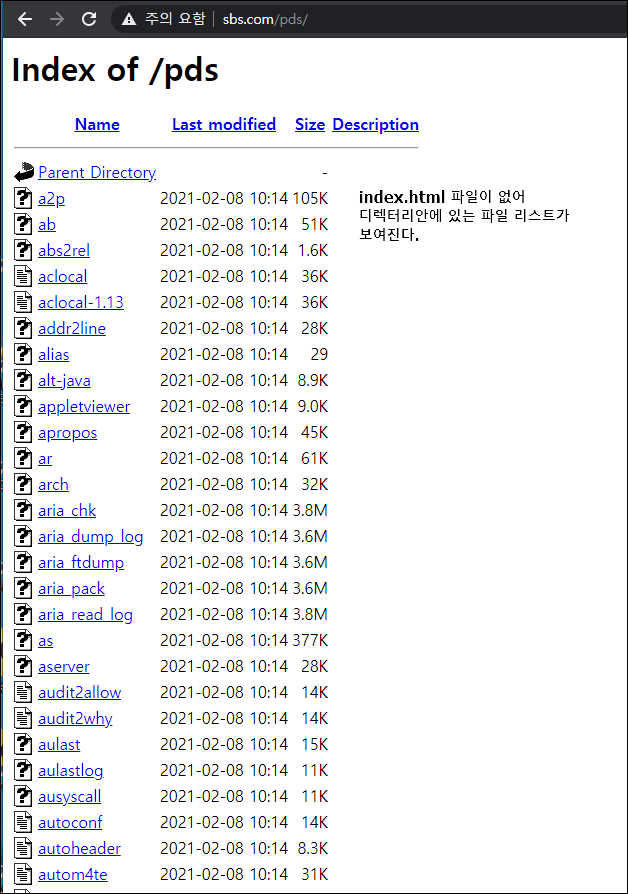
브라우저로 가서 확인한다.
sbsuser$ exit
web1 # lynx --dump sbs.com/pds
lynx 명령어로도 확인 할 수 있다.
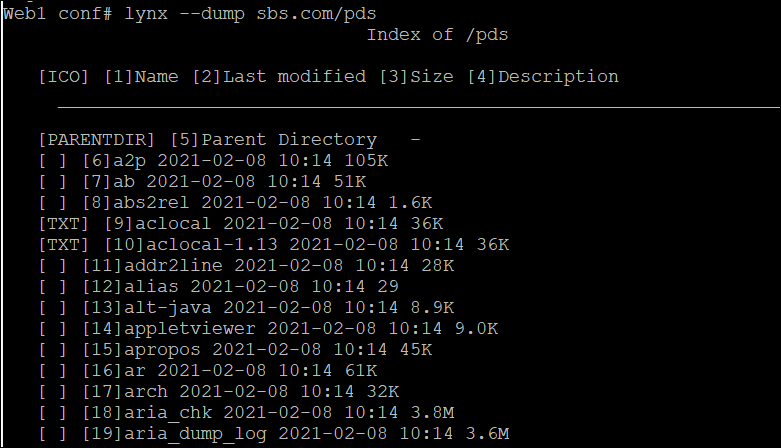
지금 index.html파일이 없기 때문에 발생한 취약점이다.
sbsuser 사용자로 해당 디렉터리에 DirectoryIndex 지시어에 해당하는 파일인
index.html을 생성하면 디렉터리 인덱싱이 출력되지 않는다.
index.html 파일을 만들어서 이 문제를 해결할 수 있다.
사용자로 들어가지 않고도 index.html파일을 만들 수 있다.
web1# su - sbsuser -c "touch public_html/pds/index.html"
web1# ls -l ~sbsuser/public_html/pds/index.html

web1# lynx --dump sbs.com/pds

pds 디렉터리 안에 index.html파일이 있지만 index.html파일 안에 내용이 없어서
아무것도 출력되지 않는다.
이렇게 항상 빈 index.html을 만들어서 넣어주지 않으니 디렉터리 컨테이너를 수정한다.
web1 # rm -rf ~sbsbuser/public_html/pds/index.html
web1 # vi /etc/httpd/conf/httpd.conf
<Directory "/home/sbsuser/public_html/pds">
# http://httpd.apache.org/docs/2.4/mod/core.html#options
#Options Indexes FollowSymLinks
Options FollowSymLinks
AllowOverride None
#Require all granted
Require all denied
</Directory>

브라우저에서 확인해봐도 forbidden이 뜬것을 확인할 수 있다.
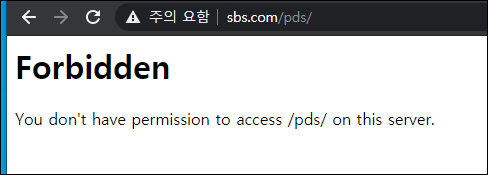
기존에 설정해 준 /etc/httpd/conf/httpd.conf 에서
|
<Directory "/home/sbsuser/public_html/pds"> # http://httpd.apache.org/docs/2.4/mod/core.html#options #Options Indexes FollowSymLinks Options FollowSymLinks AllowOverride None #Require all granted Require all denied </Directory> |
위 설정을 지우고
web1 # vi /etc/httpd/conf.d/userdir.conf
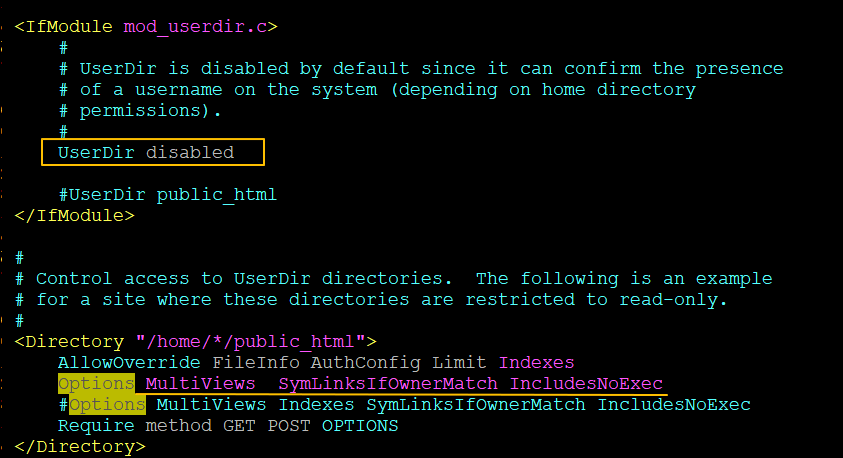
web1 # systemctl restart httpd
web1 # lynx --dump sbs.com/pds

web1 # su - sbsuser
web1 # cd public_html
web1 # ln -s /etc/passwd .
web1 # ls -l passwd

링크파일도 열리지 않는다.
실습 > ServerToken 지시어
설정값에 올 수 있는 값
Prod : 웹서버 이름만 출력한다.
Major : 웹서버 이름과 Major 버전을 출력한다.
Minor : 웹서버 이름과 Minor 버전을 출력한다.
Min : 웹서버 이름과 Mininum 버전을 출력한다.
OS : 웹서버 이름과 버전, 운영체제까지 출력한다. (기본값)
Full : 최대한의 모든 정보를 출력한다. (웹서버 이름, 버전, OS, PHP버전)
기본적으로 아래 정보를 막아줘야한다.
버전 정보이지만 이것도 취약점으로 사용될 수 있다.
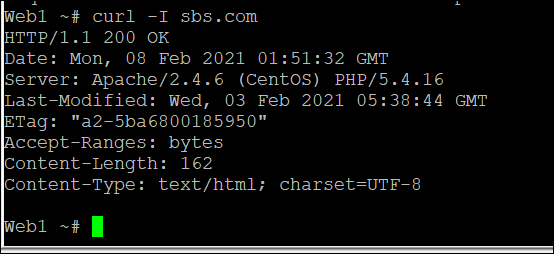
web1 # vi /etc/httpd/conf/httpd.conf
아래와 같이 추가해주기
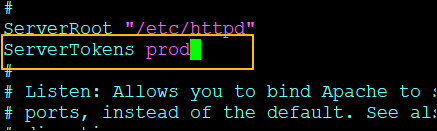
web1 # systemctl restart httpd
버전 정보가 보이지 않고 Apache만 나오는것을 알 수 있다.
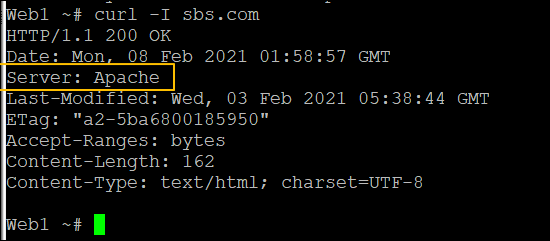
vi로 /etc/httpd/conf/httpd.conf로 한번 ServerTokens를 설정해 줬는데
이제 다시 vi로 열지 않고도 수정할 수 있다.
web1# sed -i 's/ServerTokens.*/ServerTokens Major/' /etc/httpd/conf/httpd.conf
web1# systemctl restart httpd
web1# curl -I sbs.com

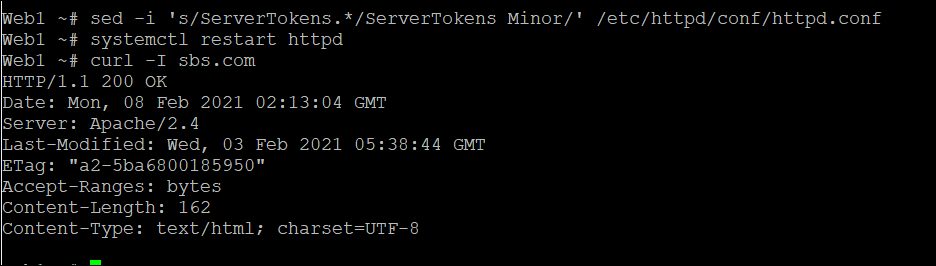
prod로 설정해주는것이 제일 안전하다.
파이썬으로 만들어서 테스트하기
import os
import time

sedCmd  = "sed -i 's/ServerTokens.*/ServerTokens %s/' /etc/httpd/conf/httpd.conf"
ServerTokensValue = ['Prod','Major', 'Minor', 'Min', 'OS', 'Full']
cmd2 = ";systemctl restart httpd; curl -I http://sbs.com"

for value in ServerTokensValue:
    print("ServerTokens:", value)
    cmd = sedCmd %value
    cmd += cmd2
    os.system(cmd)
    time.sleep(1)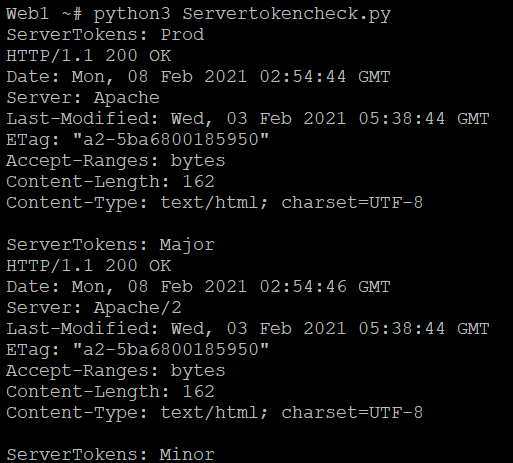
DocumentRoot : 웹 페이지가 제공되는 문서
단독으로 밖으로 나와있는 DocumentRoot "var/www/html" 디렉터리는 웹 서버 1개당 하나의 도메인을
제공할 때만 제공되는 디렉터리이고 가상 호스트로 설정할 때는 이 부분은 인식되지 않는다.
이유는 가상 호스트를 설정할 때 가상 호스트 컨테이너에서 Document 지시어가 제공되기 때문이다.
DocumentRoot "/var/www/html" <-- 가상호스트를 지정하면 인식되지 않는다.
<VirtualHost *:80>
ServerAdmin webmaster@sbs.com
DocumentRoot /home/sbsuser/public_html <----- 여기가 DocumentRoot가 설정된다.
ServerName sbs.com
ServerAlias www.sbs.com
ErrorLog logs/sbs.com-error_log
CustomLog logs/sbs.com-access_log common
</VirtualHost>
이 서버는 가상호스트를 지정하기 때문에 /var/www 디렉터리는 사용하지 않는다.
그러므로 모두 주석처리를 하거나 삭제한다.
가상 호스트가 설정되어있는지 확인하기 위해서
web1# httpd -S
-- httpd.conf --
#DocumentRoot "/var/www/html"
#<Directory "/var/www">
# AllowOverride None
# #Require all granted
#</Directory>
# Further relax access to the default document root:
#<Directory "/var/www/html">
# # http://httpd.apache.org/docs/2.4/mod/core.html#options
# Options Indexes FollowSymLinks
# AllowOverride None
# #Require all granted
# Require all denied
#</Directory>
-- httpd.conf --
[root@server2 conf]# httpd -t
Syntax OK
[root@server2 conf]# systemctl restart httpd
[root@server2 conf]# lynx --dump sbs.com
sbs.com 에 오신 것을 환영합니다.
DirectoryIndex
웹 서버의 도메인 or IP주소로 접근 시 파일명을 명시하지 않으면 DirectoryIndex 지시어에 설정된
순서대로 파일을 찾아서 클라이언트에서 전달한다.
DirectoryIndex 파일명
이 DirectoryIndex 지시어는
/etc/httpd/conf/httpd.conf 에도 있고
/etc/httpd/conf.d/php.conf 에도 있다.
이 두개의 설정에서 우선순위는 /etc/httpd/conf/httpd.conf가 가지고 있다.
php 연동 시 httpd.conf 의 DirectoryIndex 지시어는 삭제하고
httpd.d/php.conf 의 DirectoryIndex 만 사용한다.
-- httpd.conf --
#<IfModule dir_module>
# DirectoryIndex index.html
#</IfModule>
-- httpd.conf --
----------------------------> 오른쪽으로 가면서 index.php가 없으면 index.html을 찾는다.
-- httpd.d/php.conf --
DirectoryIndex index.php index.html
-- httpd.d/php.conf --
실습> 정기 점검 시간 표시하기
1. DirectoryIndex 지시어로 변경하는 방법
서비스를 하다가 서버의 정기점검을 보여주고 싶을 때 DirectoryIndex 지시어를 변경하면 된다.
단점은 메인 페이지만 수정되어 있기 때문에 브라우저에 저장된 것은 접속이 가능하다.
-- /etc/httpd/conf.d/php.conf --
#DirectoryIndex index.php index.html
DirectoryIndex imsi.html index.php index.html
-- /etc/httpd/conf.d/php.conf --
[root@server2 conf]# vi ~sbsuser/public_html/imsi.html
<html>
<head>
<meta charset="utf8">
<title> ::: sbs.com ::: </title>
</head>
<body>
<center>
정기점검 입니다. <br>
점검시간 : 2021.2.8 01:00 ~ 18:00
</center>
</body>
</html>
[root@server2 conf]# lynx --dump sbs.com
정기점검 입니다.
점검시간 : 2021.2.8 01:00 ~ 18:00
2. 웹 페이지 경로 수정하기
-- conf.d/php.conf --
DirectoryIndex index.php index.html
-- conf.d/php.conf --
web1 # vi /etc/httpd/conf.d/vhostalias.conf
디렉터리도 설정해준다.
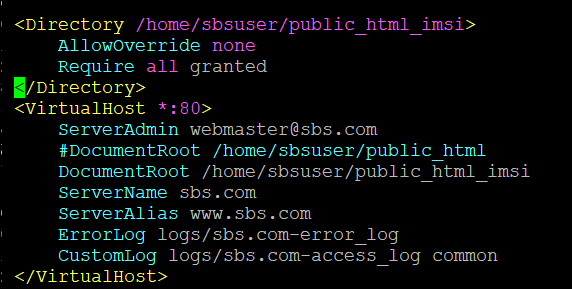
web1# su - sbsuser
마지막 로그인: 금 2월 5 08:00:40 KST 2021 일시 pts/0
[sbsuser@server2 ~]$ mkdir public_html_imsi
[sbsuser@server2 ~]$ mv public_html/imsi.html public_html_imsi/index.html
[sbsuser@server2 ~]$ chcon -Rt httpd_sys_content_t public_html_imsi
[sbsuser@server2 ~]$ logout
web1# systemctl restart httpd
web1# lynx --dump sbs.com
정기점검 입니다.
점검시간 : 2021.2.8 01:00 ~ 18:00
3. DNS 주소 변경하는 방법
DNS 를 배우고 처리!!!
4. 원래대로 돌리기
<VirtualHost *:80>
ServerAdmin webmaster@sbs.com
DocumentRoot /home/sbsuser/public_html
#DocumentRoot /home/sbsuser/public_html_imsi
ServerName sbs.com
ServerAlias www.sbs.com
ErrorLog logs/sbs.com-error_log
CustomLog logs/sbs.com-access_log common
</VirtualHost>
향후 관리 프로그램을 만들어서 웹 에서 통합으로 관리 할 수 있다.
[root@server2 conf]# setenforce 0
[root@server2 conf]# su - sbsuser
[sbsuser@server2 ~]$ cd public_html
[sbsuser@server2 public_html]$ mkdir -m 777 tmp
[sbsuser@server2 public_html]$ vi fileTest.php
<?
system("echo '1234' > tmp/a.txt");
?>
[sbsuser@server2 public_html]$ lynx --dump sbs.com/fileTest.php
[sbsuser@server2 public_html]$ ll tmp/
합계 4
-rw-r--r--. 1 apache apache 5 2월 5 10:38 a.txt
실습 > Files 지시어
Files : 웹 서버에 업로드된 파일에 대해서 접근 허용 유무를 설정하는 지시어
.htaccess : 접근 제어 파일
.ht 로 시작하는 파일에 대해서는 웹에서 보여지지 않게 설정한다.
<Files ".ht*">
Require all denied
</Files>
1. denied / granted
기본값 : Require all denied
기본값으로 되어있을때는 .ht로 시작하는 파일을 실행할 수 없다.
sbsuser에 .ht로 시작하는 파일을 만들고 실행 해 보면 forbidden이 된다.
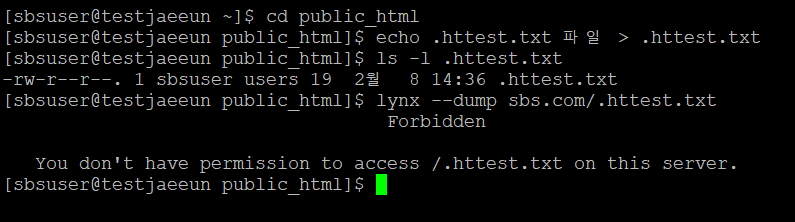
이 기본값을 granted로 바꾸면 실행가능하다.
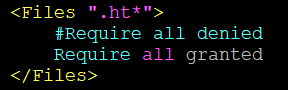
web1 # systemctl restart httpd

실습 후에는 다시 기본값으로 막아둔다.
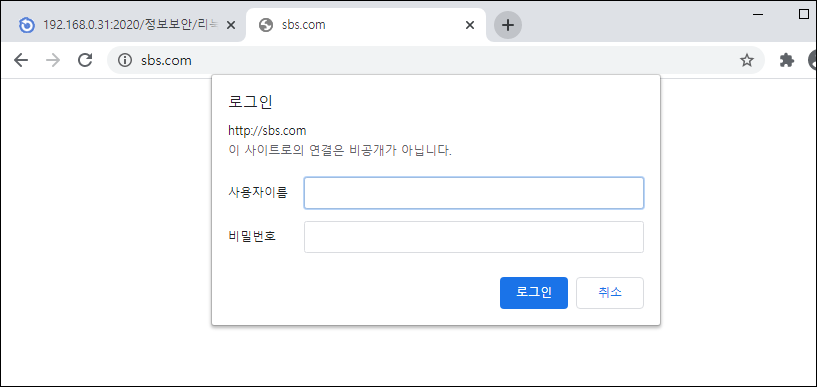
2. 접근 제어 파일 생성하기
일반사용자에서도 생성할 수 있다.
[sbsuser@server2 public_html]$ vi .htaccess
# 인증에 사용할 영역
AuthName "Admin Auth:"
# 사용자를 인증할 방법 (기본 Basic)
AuthType Basic
# 사용자
AuthUserFile "/home/sbsuser/webauth/.htpasswd"
<Limit GET POST>
# 사용자로 접근을 허용
require valid-user
</Limit>
[sbsuser@server2 public_html]$ cd ..
[sbsuser@server2 ~]$ mkdir webauth
[sbsuser@server2 ~]$ cd webauth
[sbsuser@server2 ~]$ htpasswd -c .htpasswd sbsuser
New password:
Re-type new password:
Adding password for user sbsuser
[sbsuser@server2 webauth]$ cat .htpasswd
sbsuser:$apr1$Y6fmMwBg$TdtDpGkkBAcJp9zR4XFZ10

-- 조건 --
1. kbs.com 도메인의 files 디렉터리를 생성하고 이 디렉터리를 자료실로 활용한다.
- 이 디렉터리는 디렉터리에 저장된 파일이 웹상에서 출력된다.
- 웹으로 접근하는 사용자는 클릭 시 파일을 다운로드 받을 수 있다.
- 접근 사용자는 아파치인증인 IP/PW 설정한다.
- ID : kbsuser, PW : 111111
2. mbc.com 도메인의 data 디렉터리를 생성하고 이 디렉터리를 자료실로 활용한다.
- 이 디렉터리는 디렉터리에 저장된 파일이 웹상에서 출력된다.
- 웹으로 접근하는 사용자는 클릭 시 파일을 다운로드 받을 수 있다.
- 접근 사용자는 아파치인증인 IP/PW 설정한다.
- ID : mbcuser, PW : 111111
-- 조건 --
1. kbs.com 도메인의 files 디렉터리를 생성하고 이 디렉터리를 자료실로 활용한다.
- 이 디렉터리는 디렉터리에 저장된 파일이 웹상에서 출력된다.
- 웹으로 접근하는 사용자는 클릭 시 파일을 다운로드 받을 수 있다.
- 접근 사용자는 아파치인증인 IP/PW 설정한다.
- ID : kbsuser, PW : 111111
[kbsuser@server2 ~]$ mkdir -m 755 public_html/files/
[kbsuser@server2 ~]$ cp /bin/a* public_html/files/
[kbsuser@server2 ~]$ vi public_html/files/.htaccess
# 인증에 사용할 영역
AuthName "Admin Auth:"
# 사용자를 인증할 방법 (기본 Basic)
AuthType Basic
# 사용자
AuthUserFile "/home/kbsuser/webauth/.htpasswd"
<Limit GET POST>
# 사용자로 접근을 허용
require valid-user
</Limit>
[kbsuser@server2 ~]$ mkdir webauth
[kbsuser@server2 ~]$ htpasswd -c webauth/.htpasswd kbsuser
New password:
Re-type new password:
Adding password for user kbsuser
[kbsuser@server2 ~]$ cat webauth/.htpasswd
kbsuser:$apr1$yK7X30VF$5HUOfJ65I8k51.1bvbmiH1
[root@server2 kbsuser]# vi /etc/httpd/conf.d/vhostalias.conf
<VirtualHost *:80>
ServerAdmin webmaster@kbs.com
DocumentRoot /home/kbsuser/public_html
ServerName kbs.com
ServerAlias www.kbs.com
ErrorLog logs/kbs.com-error_log
CustomLog logs/kbs.com-access_log common
<Directory /home/kbsuser/public_html/files>
#AllowOverride All
Options Indexes
Require all granted
</Directory>
</VirtualHost>
[root@server2 kbsuser]# systemctl restart httpd
아래가 안되면은 httpd_sys_content_t 로 바꾸기
[kbsuser@server2 ~]$ chcon -t httpd_user_content_t webauth/ -R
[root@server2 kbsuser]# sestatus
SELinux status: enabled
SELinuxfs mount: /sys/fs/selinux
SELinux root directory: /etc/selinux
Loaded policy name: targeted
Current mode: enforcing
Mode from config file: enforcing
Policy MLS status: enabled
Policy deny_unknown status: allowed
Max kernel policy version: 31
[kbsuser@server2 ~]$ lynx --dump kbs.com/files
HTTP: Access authorization required.
Use the -auth=id:pw parameter.
Looking up kbs.com
Making HTTP connection to kbs.com
Sending HTTP request.
HTTP request sent; waiting for response.
Alert!: Access without authorization denied -- retrying
lynx: Can't access startfile http://kbs.com/files
[kbsuser@server2 ~]$ lynx -auth=kbsuser:111111 --dump kbs.com/files
Index of /files
[ICO] [1]Name [2]Last modified [3]Size [4]Description
__________________________________________________________________
[PARENTDIR] [5]Parent Directory -
[ ] [6]a2p 2021-02-05 13:32 105K
[ ] [7]aaaaaaaaaaaaa 2021-02-05 13:32 115K
[ ] [8]ab 2021-02-05 13:32 51K
[ ] [9]abs2rel 2021-02-05 13:32 1.6K
[TXT] [10]aclocal 2021-02-05 13:32 36K
[TXT] [11]aclocal-1.13 2021-02-05 13:32 36K
[ ] [12]addr2line 2021-02-05 13:32 28K
[ ] [13]alias 2021-02-05 13:32 29
[ ] [14]alt-java 2021-02-05 13:32 8.8K
[ ] [15]appletviewer 2021-02-05 13:32 9.0K
[ ] [16]apropos 2021-02-05 13:32 45K
[ ] [17]ar 2021-02-05 13:32 61K
[ ] [18]arch 2021-02-05 13:32 32K
[ ] [19]aria_chk 2021-02-05 13:32 3.8M
[ ] [20]aria_dump_log 2021-02-05 13:32 3.6M
[ ] [21]aria_ftdump 2021-02-05 13:32 3.6M
[ ] [22]aria_pack 2021-02-05 13:32 3.6M
[ ] [23]aria_read_log 2021-02-05 13:32 3.8M
[ ] [24]as 2021-02-05 13:32 377K
[ ] [25]aserver 2021-02-05 13:32 28K
[ ] [26]attr 2021-02-05 13:32 11K
[TXT] [27]audit2allow 2021-02-05 13:32 14K
[TXT] [28]audit2why 2021-02-05 13:32 14K
[ ] [29]aulast 2021-02-05 13:32 15K
[ ] [30]aulastlog 2021-02-05 13:32 11K
[ ] [31]ausyscall 2021-02-05 13:32 11K
[TXT] [32]autoconf 2021-02-05 13:32 14K
[TXT] [33]autoheader 2021-02-05 13:32 8.3K
[TXT] [34]autom4te 2021-02-05 13:32 31K
[TXT] [35]automake 2021-02-05 13:32 246K
[TXT] [36]automake-1.13 2021-02-05 13:32 246K
[TXT] [37]autoreconf 2021-02-05 13:32 21K
[TXT] [38]autoscan 2021-02-05 13:32 17K
[TXT] [39]autoupdate 2021-02-05 13:32 33K
[ ] [40]auvirt 2021-02-05 13:32 32K
[ ] [41]awk 2021-02-05 13:32 419K
[DIR] [42]webauth/ 2021-02-05 12:53 -
__________________________________________________________________
References
1. http://kbs.com/files/?C=N;O=D
2. http://kbs.com/files/?C=M;O=A
3. http://kbs.com/files/?C=S;O=A
4. http://kbs.com/files/?C=D;O=A
7. http://kbs.com/files/aaaaaaaaaaaaa
9. http://kbs.com/files/abs2rel
10. http://kbs.com/files/aclocal
11. http://kbs.com/files/aclocal-1.13
12. http://kbs.com/files/addr2line
13. http://kbs.com/files/alias
14. http://kbs.com/files/alt-java
15. http://kbs.com/files/appletviewer
16. http://kbs.com/files/apropos
19. http://kbs.com/files/aria_chk
20. http://kbs.com/files/aria_dump_log
21. http://kbs.com/files/aria_ftdump
22. http://kbs.com/files/aria_pack
23. http://kbs.com/files/aria_read_log
25. http://kbs.com/files/aserver
27. http://kbs.com/files/audit2allow
28. http://kbs.com/files/audit2why
29. http://kbs.com/files/aulast
30. http://kbs.com/files/aulastlog
31. http://kbs.com/files/ausyscall
32. http://kbs.com/files/autoconf
33. http://kbs.com/files/autoheader
34. http://kbs.com/files/autom4te
35. http://kbs.com/files/automake
36. http://kbs.com/files/automake-1.13
37. http://kbs.com/files/autoreconf
38. http://kbs.com/files/autoscan
39. http://kbs.com/files/autoupdate
40. http://kbs.com/files/auvirt
42. http://kbs.com/files/webauth/
2. mbc.com 도메인의 data 디렉터리를 생성하고 이 디렉터리를 자료실로 활용한다.
- 이 디렉터리는 디렉터리에 저장된 파일이 웹상에서 출력된다.
- 웹으로 접근하는 사용자는 클릭 시 파일을 다운로드 받을 수 있다.
- 접근 사용자는 아파치인증인 IP/PW 설정한다.
- ID : mbcuser, PW : 111111
[mbcuser@server2 ~]$ mkdir -m 755 public_html/data
[mbcuser@server2 ~]$ cp -a /bin/a* public_html/data/
[mbcuser@server2 ~]$ vi public_html/data/.htaccess
# 인증에 사용할 영역
AuthName "Admin Auth:"
# 사용자를 인증할 방법 (기본 Basic)
AuthType Basic
# 사용자
AuthUserFile "/home/mbcuser/webauth/.htpasswd"
<Limit GET POST>
# 사용자로 접근을 허용
require valid-user
</Limit>
[mbcuser@server2 ~]$ mkdir webauth
[mbcuser@server2 ~]$ htpasswd -c webauth/.htpasswd mbcuser
New password:
Re-type new password:
Adding password for user mbcuser
[mbcuser@server2 ~]$ cat webauth/.htpasswd
mbcuser:$apr1$RD9n7zu0$CsT1DX70edA0/DLfmMNjg1
[mbcuser@server2 ~]$ chcon -Rt httpd_user_content_t webauth/
[root@server2 ~]# vi /etc/httpd/conf.d/vhostalias.conf
<VirtualHost *:80>
ServerAdmin webmaster@mbc.com
DocumentRoot /home/mbcuser/public_html
ServerName mbc.com
ServerAlias www.mbc.com
ErrorLog logs/mbc.com-error_log
CustomLog logs/mbc.com-access_log common
<Directory /home/mbcuser/public_html/data>
Options Indexes
Require all granted
</Directory>
</VirtualHost>
[root@server2 ~]# systemctl restart httpd
크롬에서 도메인으로 접근해서 인증이 나오면 id/pw 를 입력해서 로그인해서 파일 리스트가
출력되는지 확인한다.
mbc.com 접속 시 디렉터리에 인증이 설정되어 있어서 접근할 수 없다.
[mbcuser@server2 data]$ lynx --dump mbc.com/data
HTTP: Access authorization required.
Use the -auth=id:pw parameter.
Looking up mbc.com
Making HTTP connection to mbc.com
Sending HTTP request.
HTTP request sent; waiting for response.
Alert!: Access without authorization denied -- retrying
lynx: Can't access startfile http://mbc.com/data
lynx에서 메인으로 접근해서 id/pw 를 입력해서 로그인해서 파일 리스트가 출력되는지 확인한다.
[root@server2 ~]# lynx --dump --auth=mbcuser:111111 mbc.com/data
Index of /data
[ICO] [1]Name [2]Last modified [3]Size [4]Description
__________________________________________________________________
[PARENTDIR] [5]Parent Directory -
[ ] [6]a2p 2020-10-02 01:55 105K
[ ] [7]aaaaaaaaaaaaa 2019-08-20 15:25 115K
[ ] [8]ab 2020-11-17 01:19 51K
[ ] [9]abs2rel 2015-11-21 05:02 1.6K
[TXT] [10]aclocal 2014-06-10 17:03 36K
[TXT] [11]aclocal-1.13 2014-06-10 17:03 36K
[ ] [12]addr2line 2020-10-02 01:37 28K
[ ] [13]alias 2020-04-01 11:17 29
[ ] [14]ar 2020-10-02 01:37 61K
[ ] [15]arch 2020-11-17 07:24 32K
[ ] [16]aria_chk 2020-10-02 01:56 3.8M
[ ] [17]aria_dump_log 2020-10-02 01:56 3.6M
[ ] [18]aria_ftdump 2020-10-02 01:56 3.6M
[ ] [19]aria_pack 2020-10-02 01:56 3.6M
[ ] [20]aria_read_log 2020-10-02 01:56 3.8M
[ ] [21]as 2020-10-02 01:37 377K
[ ] [22]aserver 2019-08-08 21:00 28K
[ ] [23]attr 2018-04-11 09:40 11K
[TXT] [24]audit2allow 2020-04-01 13:04 14K
[ ] [25]aulast 2019-08-08 21:06 15K
[ ] [26]aulastlog 2019-08-08 21:06 11K
[ ] [27]ausyscall 2019-08-08 21:06 11K
[TXT] [28]autoconf 2014-06-10 14:41 14K
[TXT] [29]autoheader 2014-06-10 14:41 8.3K
[TXT] [30]autom4te 2014-06-10 14:41 31K
[TXT] [31]automake 2014-06-10 17:03 246K
[TXT] [32]automake-1.13 2014-06-10 17:03 246K
[TXT] [33]autoreconf 2014-06-10 14:41 21K
[TXT] [34]autoscan 2014-06-10 14:41 17K
[TXT] [35]autoupdate 2014-06-10 14:41 33K
[ ] [36]auvirt 2019-08-08 21:06 32K
__________________________________________________________________
References
1. http://mbc.com/data/?C=N;O=D
2. http://mbc.com/data/?C=M;O=A
3. http://mbc.com/data/?C=S;O=A
4. http://mbc.com/data/?C=D;O=A
7. http://mbc.com/data/aaaaaaaaaaaaa
9. http://mbc.com/data/abs2rel
10. http://mbc.com/data/aclocal
11. http://mbc.com/data/aclocal-1.13
12. http://mbc.com/data/addr2line
16. http://mbc.com/data/aria_chk
17. http://mbc.com/data/aria_dump_log
18. http://mbc.com/data/aria_ftdump
19. http://mbc.com/data/aria_pack
20. http://mbc.com/data/aria_read_log
22. http://mbc.com/data/aserver
24. http://mbc.com/data/audit2allow
25. http://mbc.com/data/aulast
26. http://mbc.com/data/aulastlog
27. http://mbc.com/data/ausyscall
28. http://mbc.com/data/autoconf
29. http://mbc.com/data/autoheader
30. http://mbc.com/data/autom4te
31. http://mbc.com/data/automake
32. http://mbc.com/data/automake-1.13
33. http://mbc.com/data/autoreconf
34. http://mbc.com/data/autoscan
35. http://mbc.com/data/autoupdate
36. http://mbc.com/data/auvirt
ErrorLog 지시어
ErrorLog : 에러가 기록되는 파일의 경로를 가지는 지시어
가상호스트에서도 지정이 가능해서 가상호스트에 ErrorLog가 지정되어 있으면 에러로그가 그쪽으로 저장되고 없으면
<VirtualHost> 밖에 있는 ErrorLog에 기록된다.
ErrorLog : "logs/error_log" => /var/log/httpd/error_log 에 기록된다.
<VirtualHost *:80>
ServerAdmin webmaster@sbs.com
DocumentRoot /home/sbsuser/public_html
#DocumentRoot /home/sbsuser/public_html_imsi
ServerName sbs.com
ServerAlias www.sbs.com
ErrorLog logs/sbs.com-error_log <== /var/log/httpd/sbs.com-error.log 에 기록된다.
CustomLog logs/sbs.com-access_log common
</VirtualHost>
LogFormat & CustomLog
아파치 로그는 텍스트 파일로 로그가 기록되므로 텍스트 파일을 볼 수 있는 명령어로 내용을 볼 수 있다.
LogFormat : 로그가 기록되는 형식
CustomLog : 클라이언트가 접근 시 기록되는 로그
리눅스에서 기록되는 로그는 크게 2가지 종류가 있다.
첫 번째 텍스트 형태로 기록되는 로그
- cat, tail, head 이용해서 확인한다.
- 텍스트 파일이므로 실시간 로그 모니터링이 가능하다.
- tail -f /var/log/httpd/access_log
두 번째 바이너리 형태로 기록되는 로그
- 특정 프로그램을 이용해서 확인한다.
로그포맷
%h : 원격 호스트 (클라이언트 IP주소)
%u : 인증 모듈 사용시 로그인한 ID
%t : common log format 시간 형식(표준 영어 형식)의 시간
%r : 요청의 첫번째 줄
%>s : 상태(status)
%b : HTTP 헤더를 제외한 전송 바이트수. CLF 형식과 같이 전송한 내용이 없는 경우 0 대신 '-'가 출력됨
%{Referer} : Referer 어디에서 왔는지 알수 있음.
%{User-Agent} : User agent 접속한 클라이언트의 브라우저 종류
LogFormat "%h %l %u %t \"%r\" %>s %b \"%{Referer}i\" \"%{User-Agent}i\"" combined
CustomLog "logs/access_log" combined
실습 > LogFormat 변경
User-Agent : 클라이언트의 브라우저 정보를 가지고 있는 환경변수
User-Agent 가 있는 로그
-- httpd.conf --
<IfModule log_config_module>
:
:(생략)
# 아래 설정 추가
Logformat "%h %t \"%r\" \"%{User-Agent}i\"" linuxmasternet
</IfModule>
-- httpd.conf --
-- vhostalias.conf --
<VirtualHost *:80>
ServerAdmin webmaster@sbs.com
DocumentRoot /home/sbsuser/public_html
ServerName sbs.com
ServerAlias www.sbs.com
ErrorLog logs/sbs.com-error_log
CustomLog logs/sbs.com-access_log linuxmasternet
</VirtualHost>
-- vhostalias.conf --
[root@server2 ~]# systemctl restart httpd
User-Agent 가 없는 로그
LogFormat 변경
-- httpd.conf --
<IfModule log_config_module>
:
:(생략)
# 아래 설정 추가
#Logformat "%h %t \"%r\" \"%{User-Agent}i\"" linuxmasternet
Logformat "%h %t \"%r\"" linuxmasternet
</IfModule>
-- httpd.conf --
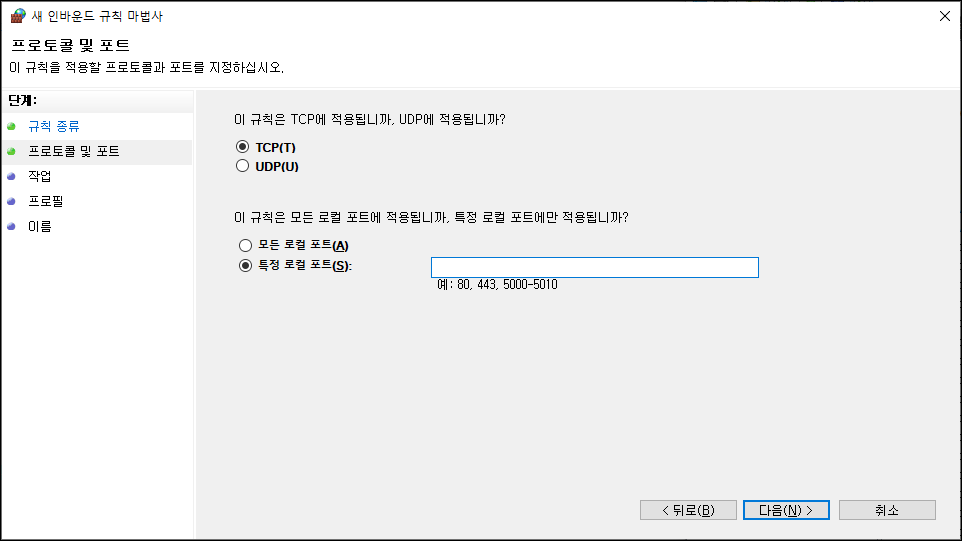
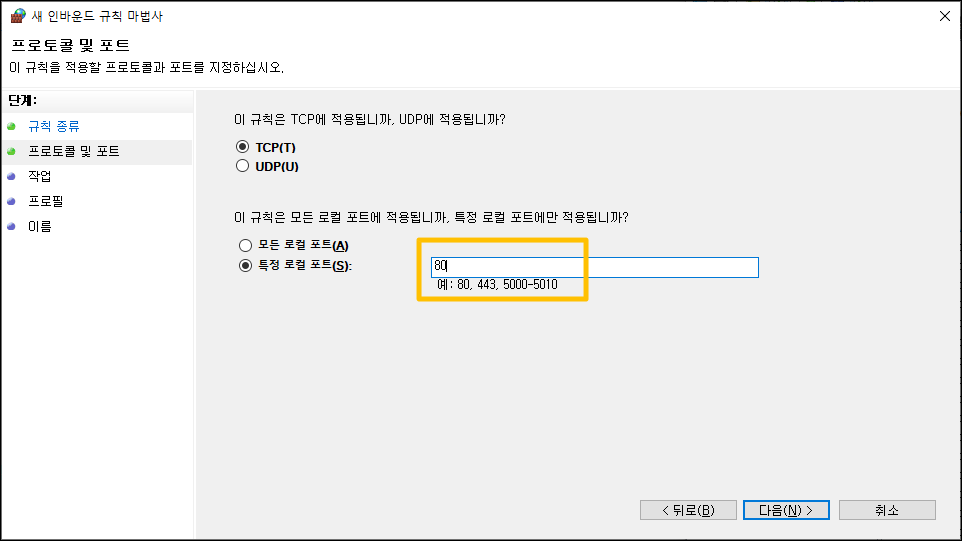
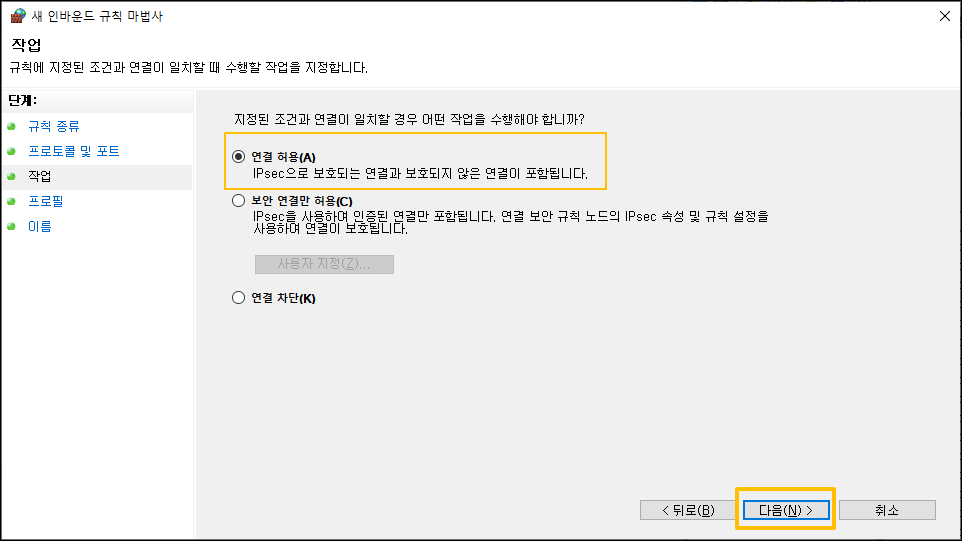
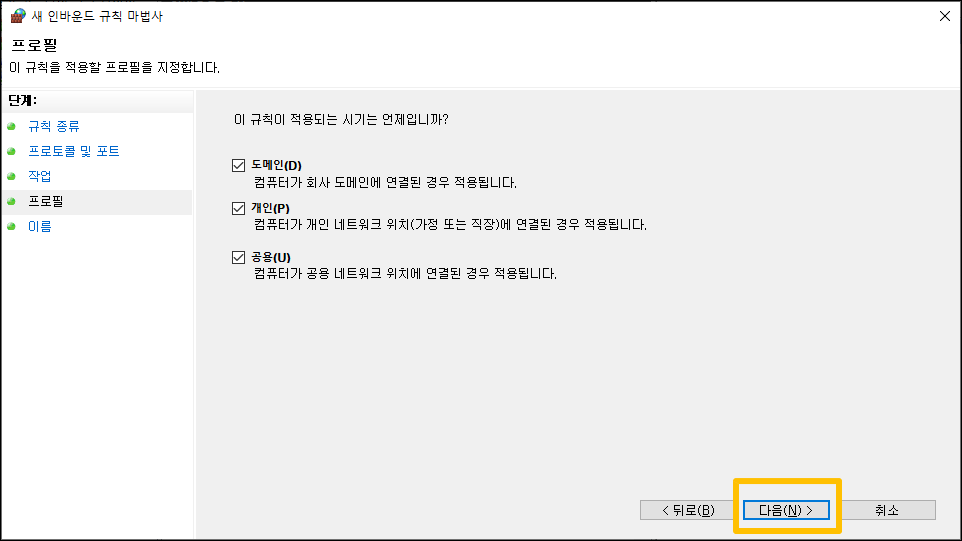
실습 > 포트 포워딩 설정
자신의 host 컴퓨터 ip를 확인한다.
cmd -> ipconfig ->
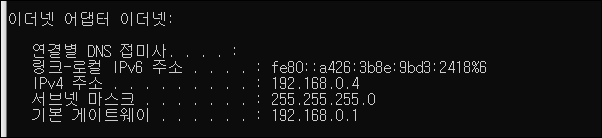
vmnet8의 nat을 수정한다.
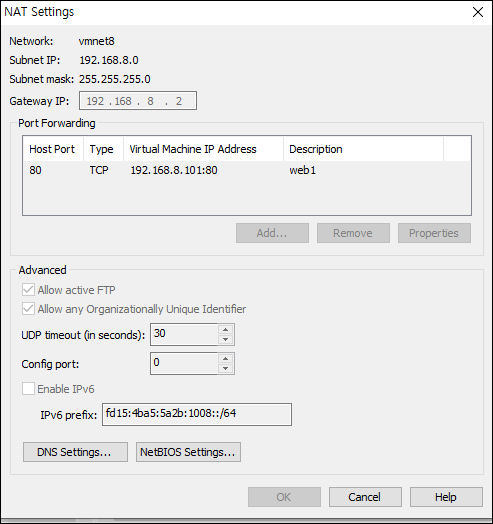
그리고 C:\Windows\System32\drivers\etc 의 hosts 파일을 수정한다.
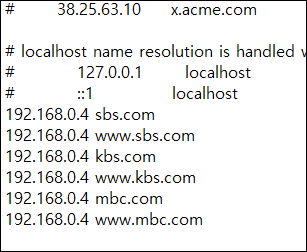
자신의 host ip로 로그가 남는다.

핸드폰에서 접속해보기
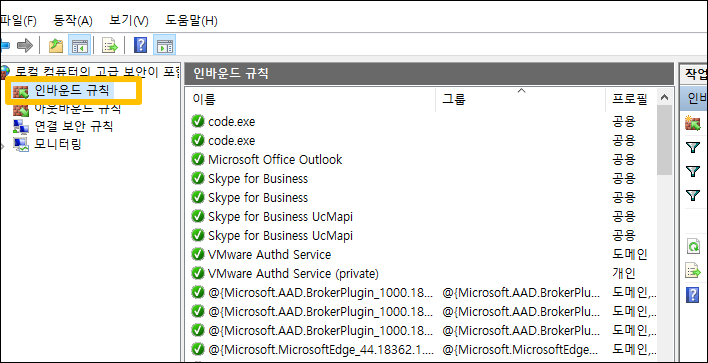
1. 검색에서 제어판을 선택
2. 시스템 및 보안
3. 방화벽 상태확인(firewall.cpl)
4. 고급 설정
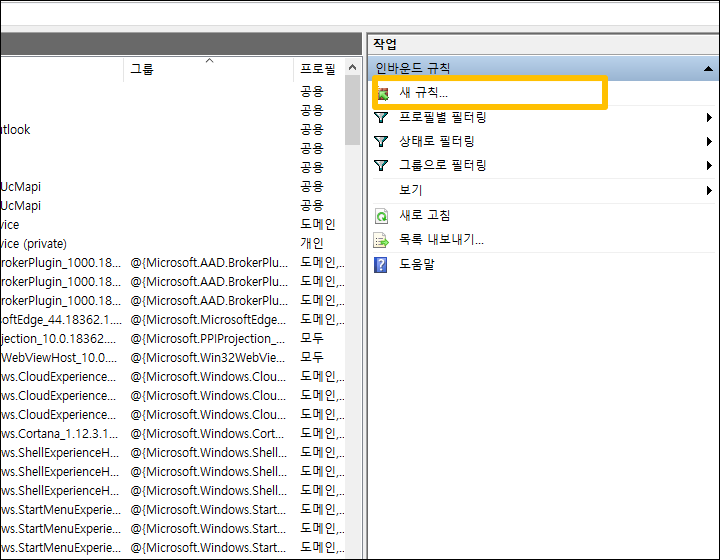
5. 새 규칙
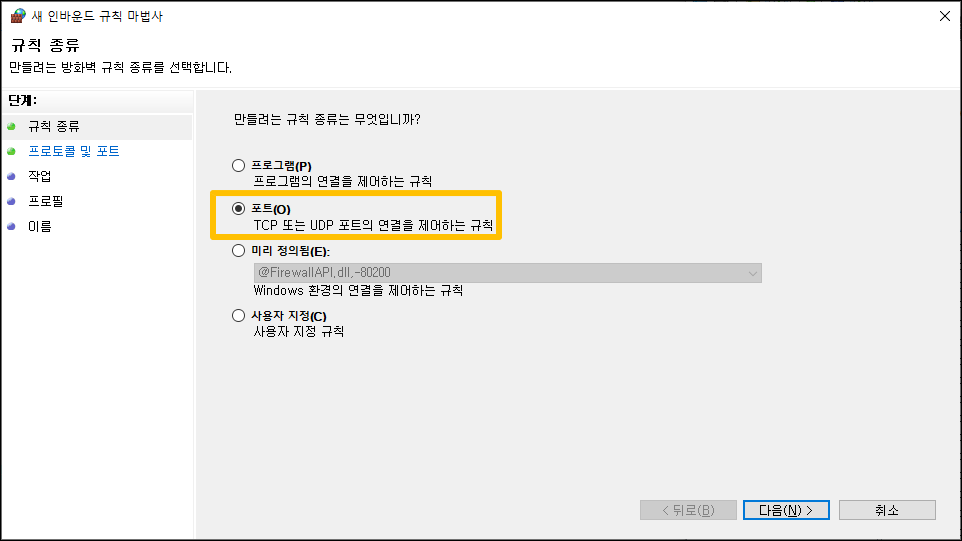

# vi /etc/hosts 파일을 수정해준다.
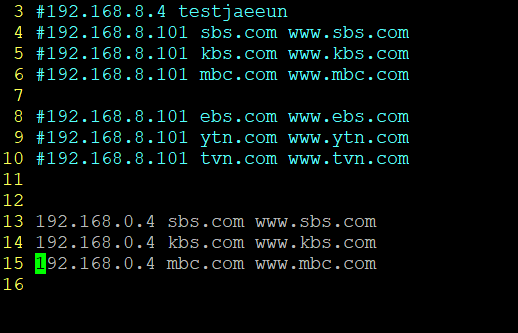
핸드폰으로도 접속 가능하다.
'정보보안(시스템,네트워크) > 리눅스' 카테고리의 다른 글
| DAY_34 MPM, Nginx (0) | 2021.02.10 |
|---|---|
| DAY_33 CGI (0) | 2021.02.09 |
| DAY_31 두번째 DB연결해주기 (0) | 2021.02.05 |
| DAY_30 서버 교체해보기 (0) | 2021.02.04 |
| DAY_29 가상호스트 (0) | 2021.02.03 |